

This summer 404 Media ran a hall of shame for AI flyers, built from the ones its readers sent in.
The same week, LADbible reported customers publicly calling out local businesses for their ChatGPT adverts.
So I made six flyers in ChatGPT and looked at what gives them away.
New here? Grab a coffee, you're in the right place. Been here a while? Thanks for sticking around.
Know someone who makes the flyers at your company? Forward this to them.
By the end you’ll have one prompt, the five signs to check for, and a 30-second check before you post.
How I made the six flyers
I picked six jobs a small business does every month: a summer sale, a free webinar, a café menu, a job ad, a jazz night in the park and a granola launch.
For each one, I wrote the exact lines of text and asked ChatGPT for the kind of flyer you see on every Facebook event page.
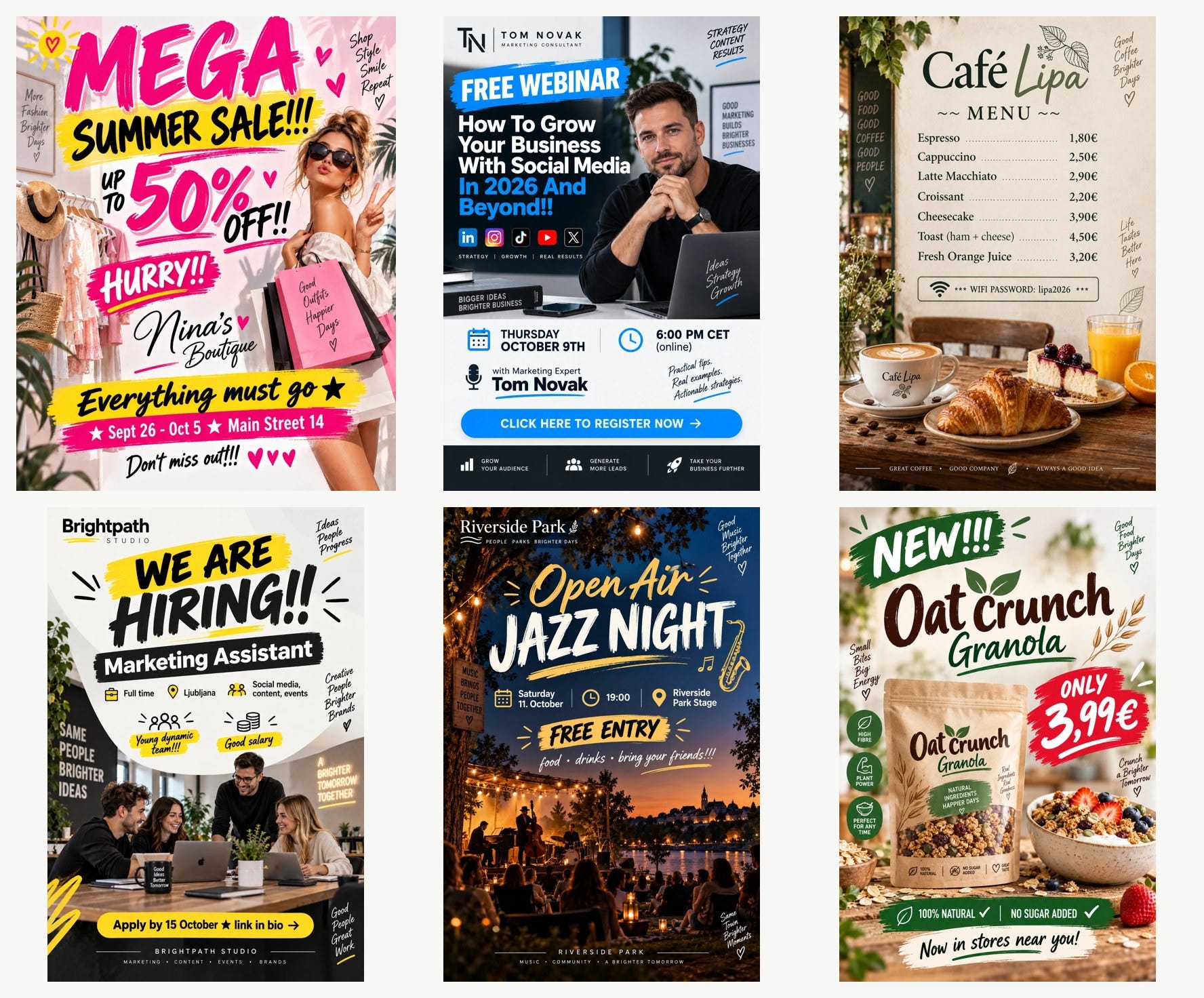
The good news first. Every word I gave it was spelled right: every date, time, price and the café’s wifi password.
What went wrong
ChatGPT added text I never wrote to all six posters.
Each one got a handwritten slogan in a corner. The boutique got “More Fashion Brighter Days”. The café got “Good Coffee Brighter Days”. The jazz night got “Good Music Brighter Together”. Six different businesses, and the same word on every poster.
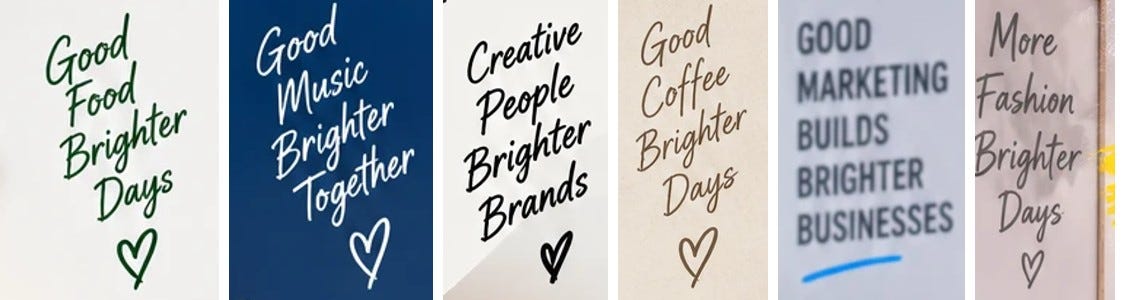
It also wrote on everything it drew. The café’s chalkboard says “Good food, good coffee, good people”. A mug on the job ad says “Good ideas, better tomorrow”. The webinar poster got a row of promises at the bottom: grow your audience, generate more leads.
The granola poster is where it becomes a real problem. ChatGPT added three round badges: “High fibre”, “Plant power” and “Perfect for any time”. I never gave it any of those.
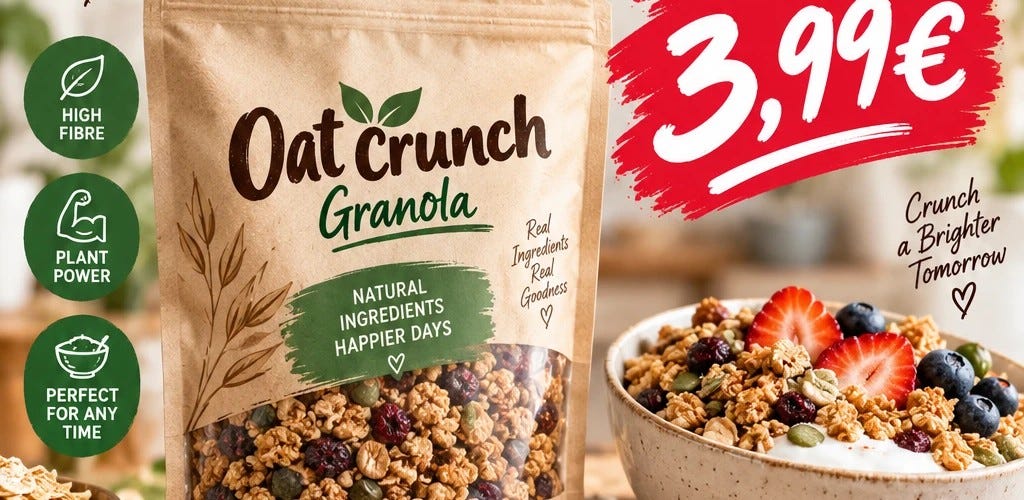
In the EU, “high fibre” is a regulated nutrition claim, and a product has to meet a set amount of fibre before the label can say it.
A designer would never add a claim the client didn’t give them. ChatGPT fills empty space with the kind of copy it has seen on thousands of templates.
The five signs people spot
Once you’ve seen these, you’ll see them on every noticeboard.
A slogan nobody wrote. A small handwritten line in a corner, usually with a heart.
A brush stroke behind every headline. Every important line sits on a painted streak of colour, so none of them stands out.
An icon for every detail. A calendar next to the date, a clock next to the time, a pin next to the address, each in its own circle.
Everything at the same volume. Five fonts, four colours and nothing that clearly comes first.
Perfect people in perfect light. Smiling teams around a laptop, a model with shopping bags, a speaker with his chin on his hands.
The prompt
The fix has two parts. The first part protects your text. The second part gives ChatGPT something to design around.
Upload your poster, then paste this with your own lines in the TEXT section:
You are a senior art director at a top design studio. Redesign the poster I uploaded from scratch. Treat it as a brief, not as a layout to tidy up.
TEXT
The finished poster contains these lines and nothing else, spelled exactly as written inside the quotes:
“LINE ONE” / “LINE TWO” / “LINE THREE”
Every line on the list must appear, even if it feels like clutter.
Delete every other word on my poster: slogans, taglines, handwritten notes, words on signs, mugs and packaging, icon labels, logos I didn’t list. Don’t invent new ones.
IDEA
[One sentence: the single visual idea the poster is built around.]
STYLE
[One line from the style list, or leave it empty.]
ART DIRECTION
1. One hero. The most important line is at least 3 times bigger than anything else.
2. Two typefaces at most, chosen for this business. Set them properly: tight headline spacing, calm body text.
3. Two or three colours plus black or white. No gradients, glow, brush-stroke highlights, starbursts or drop shadows.
4. One image or none. No icons in circles, no clip-art, no emojis, no hearts, no stock people smiling at a laptop.
5. Reading order: hero, then the detail people act on (date, time, price, place), then the small print.
6. A real grid, wide margins, at least a third of the poster left empty.
7. Every element must carry information or the idea. If it’s decoration, remove it.
FORMAT: vertical 4:5.
Before you finish, read the poster back line by line against my TEXT list. Fix any word, digit, date or currency sign that changed, and remove any text that isn’t on the list.
The TEXT section does most of the work. Quotes tell ChatGPT these exact characters matter, and “nothing else” gives it permission to leave space empty. Without that line it keeps adding copy.
The IDEA section is what makes it look designed. “Make it cleaner” gets you a tidier version of the same template. One sentence about a picture gets you a poster.
What an idea looks like
Here’s the one sentence I gave ChatGPT for each flyer, and what came back.
The sale
The discount is the picture: “50%” set enormous in a serif, cropped by the edge, with one linen dress on a hanger casting a hard shadow across it.
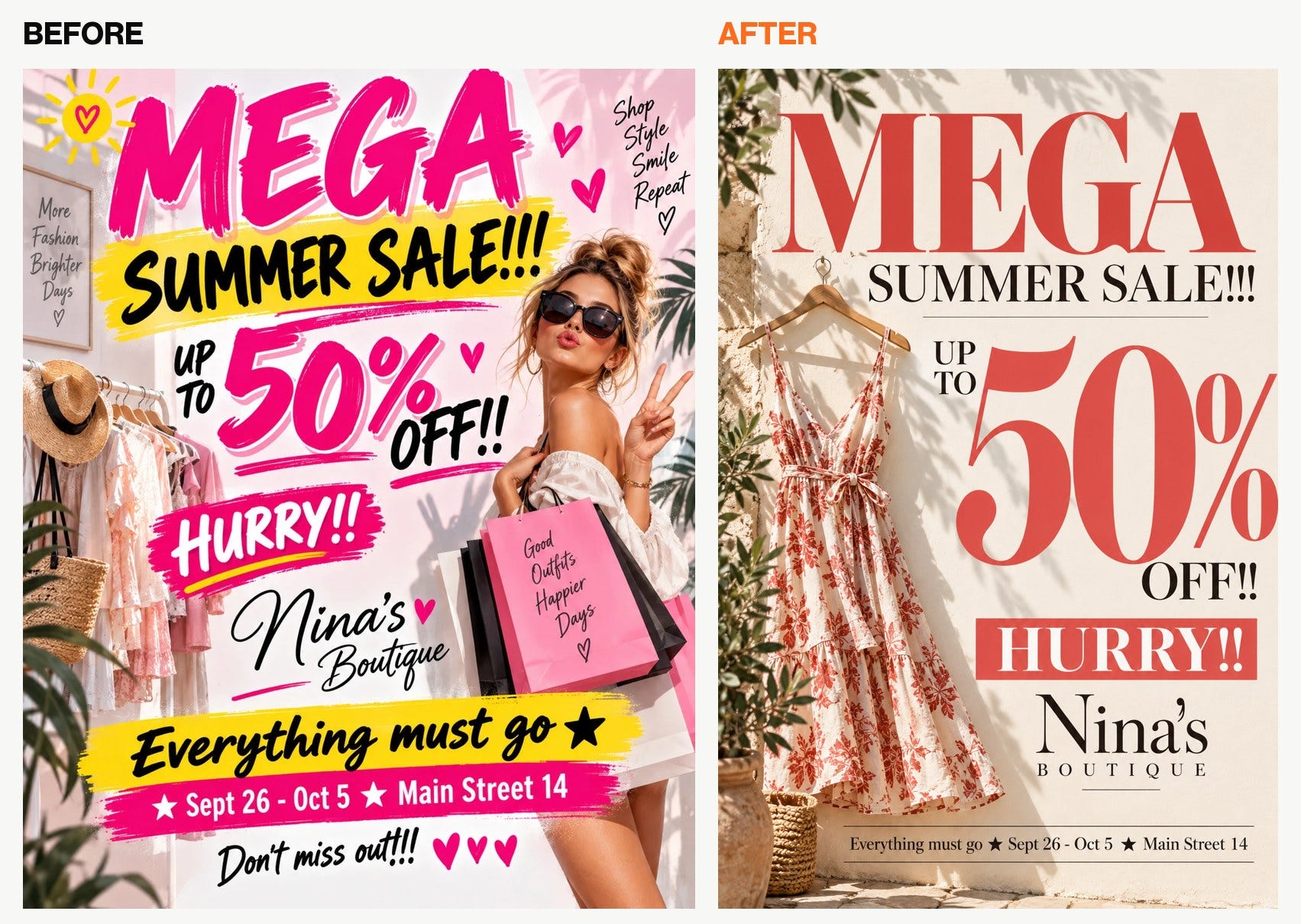
Every word right and no slogans.
The webinar
The long title is the design: set huge, flush left over six lines, with “2026” as the only word in colour.
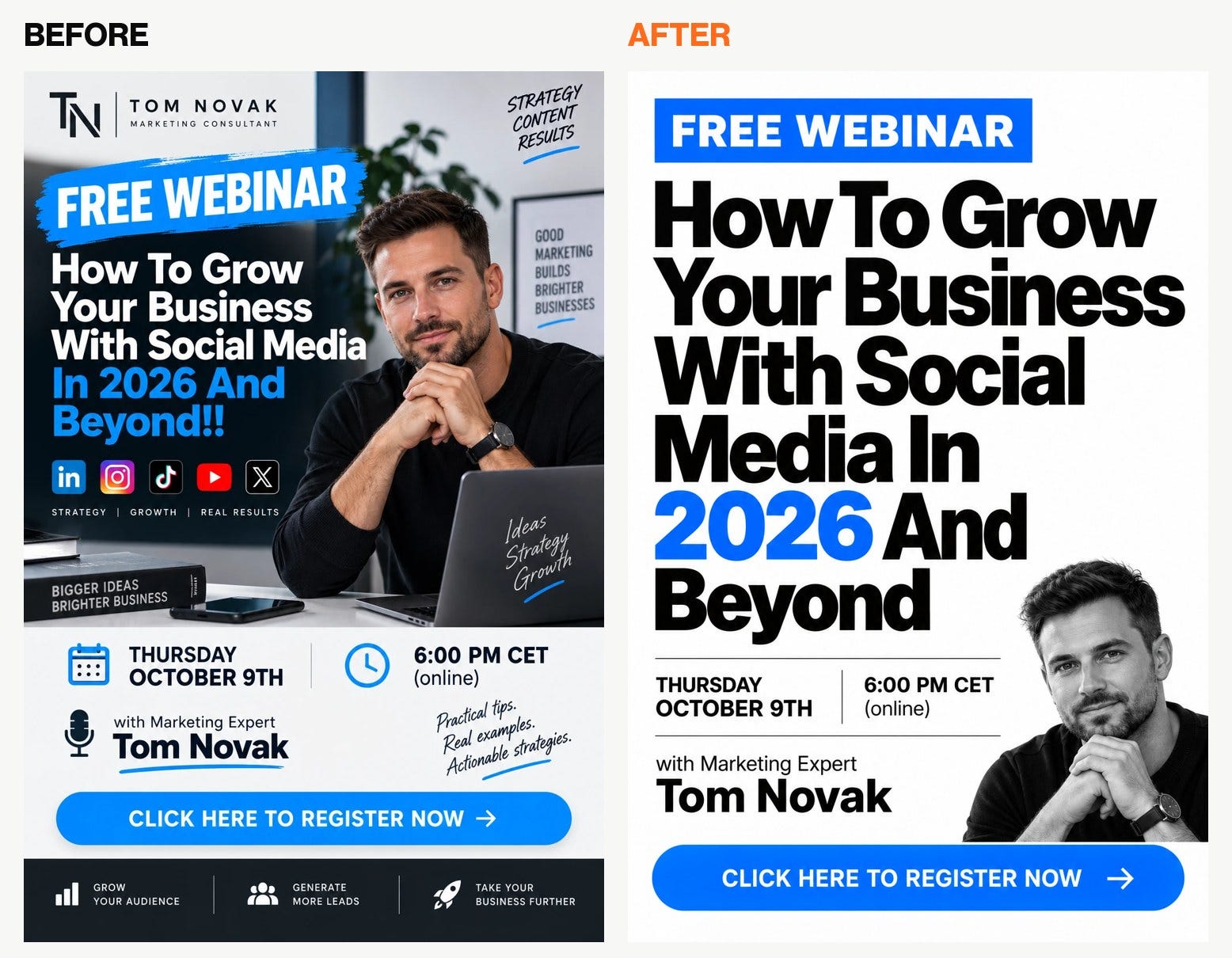
Every word right and nothing added.
The café menu
A printed menu card for a small European café, with one lime-tree leaf drawn in a single line. Lipa means lime tree.
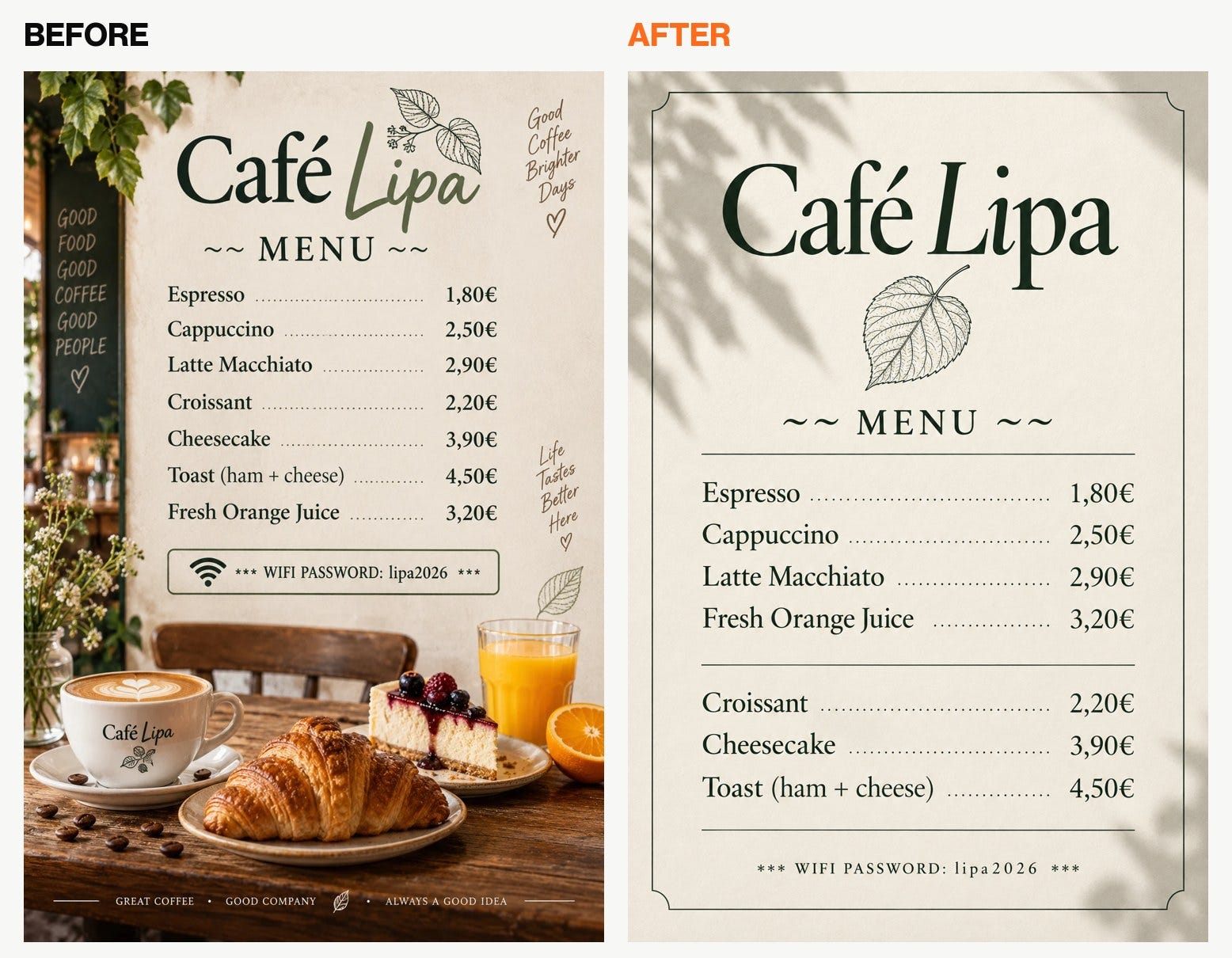
All 10 lines right and nothing added. It grouped the drinks and the food on its own, without inventing headings.
The job ad.
“Your seat is free”: one empty chair pulled out from a clean desk, shot from above, with the job title as the hero.
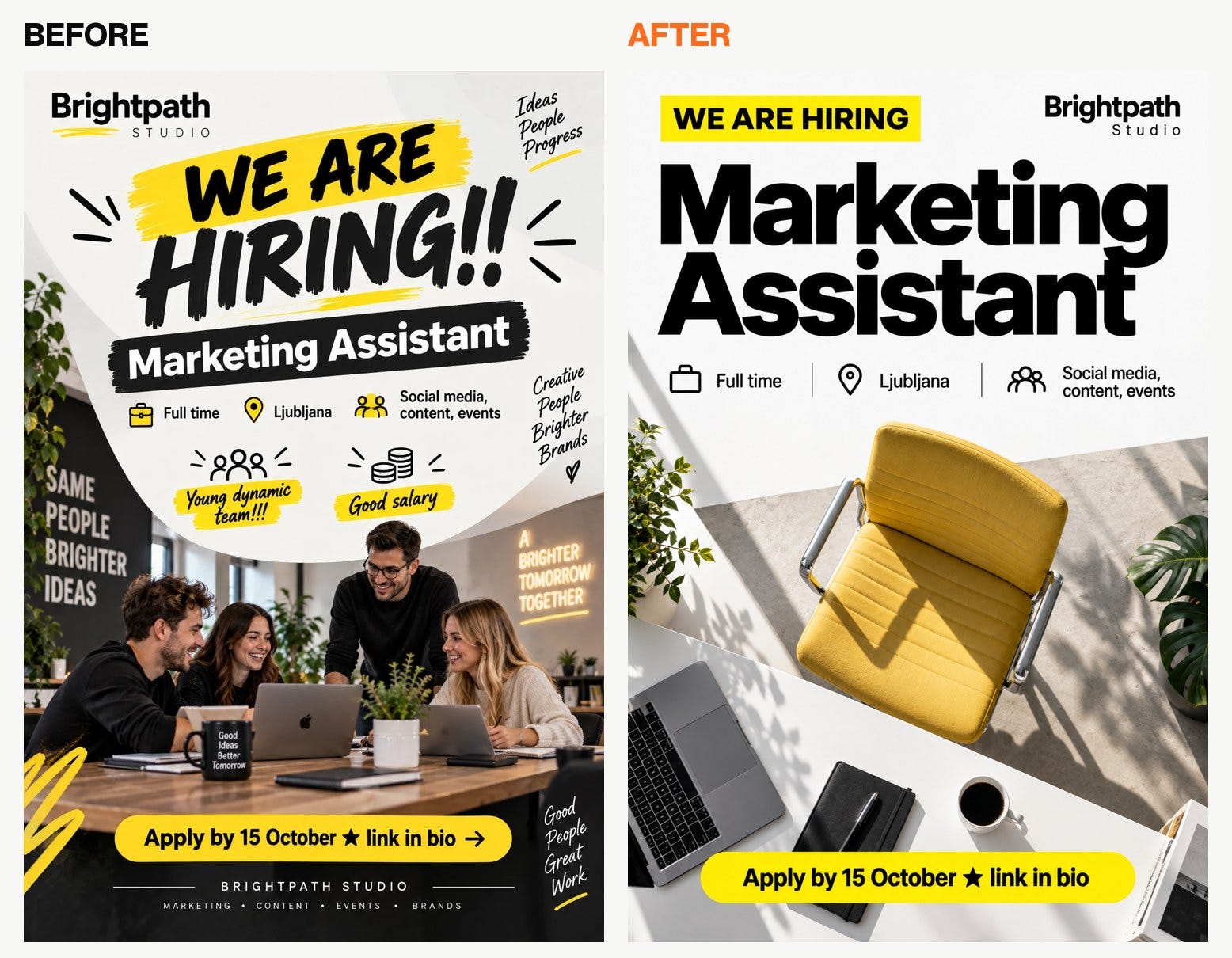
No slogans and no fake mug, but it cut two lines: “Young dynamic team!!!” and “Good salary”. It also kept small icons next to the three facts.
The jazz night
A 1950s record sleeve: a duotone close-up of a saxophone and tall condensed capitals over blocks of colour.
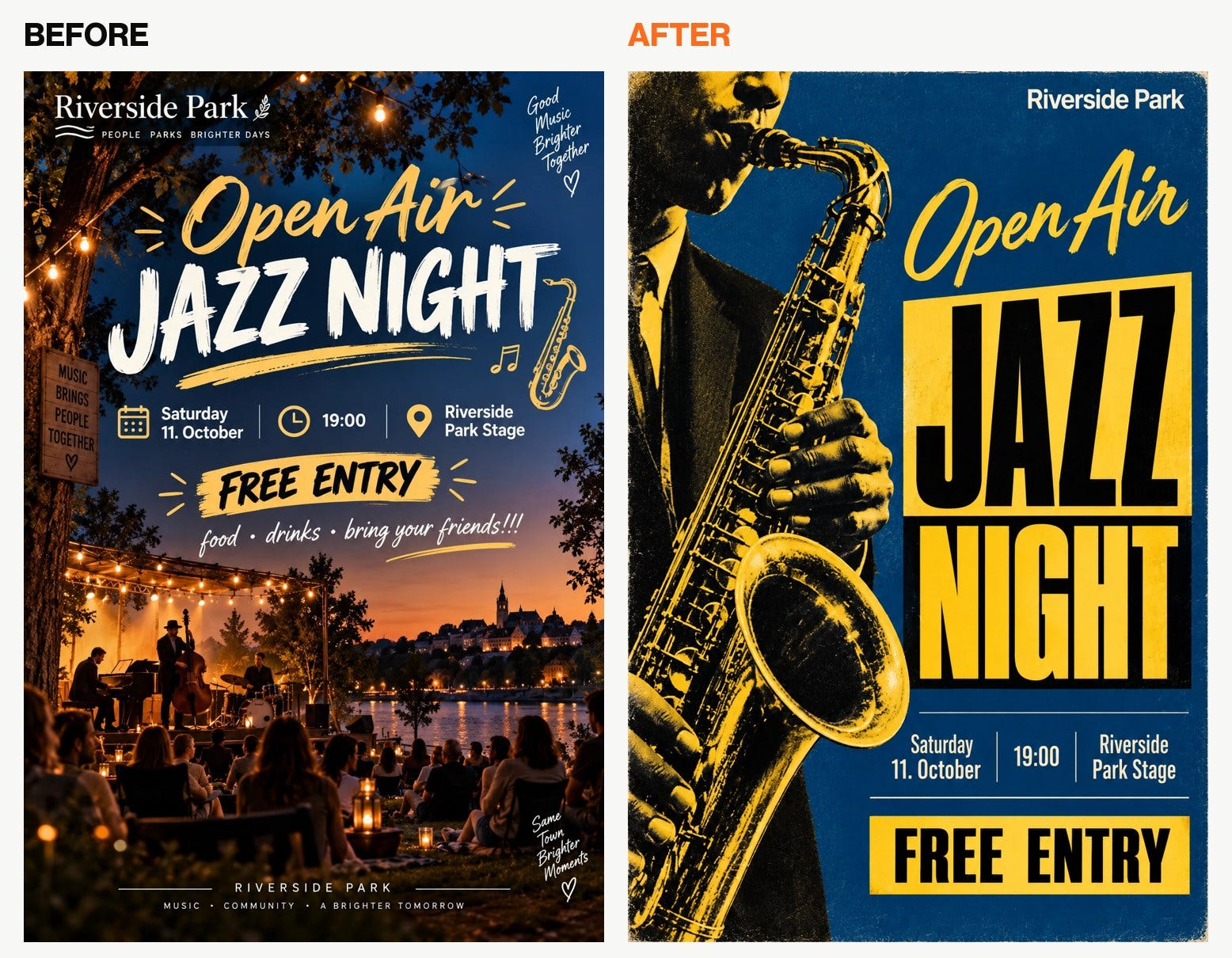
Every date, time and place right. It dropped “food • drinks • bring your friends!!!” and put “Riverside Park” at the top as a small logo.
The granola launch
The product is the hero: one pouch on a plain oat-coloured backdrop, with a single column of oats falling behind it.
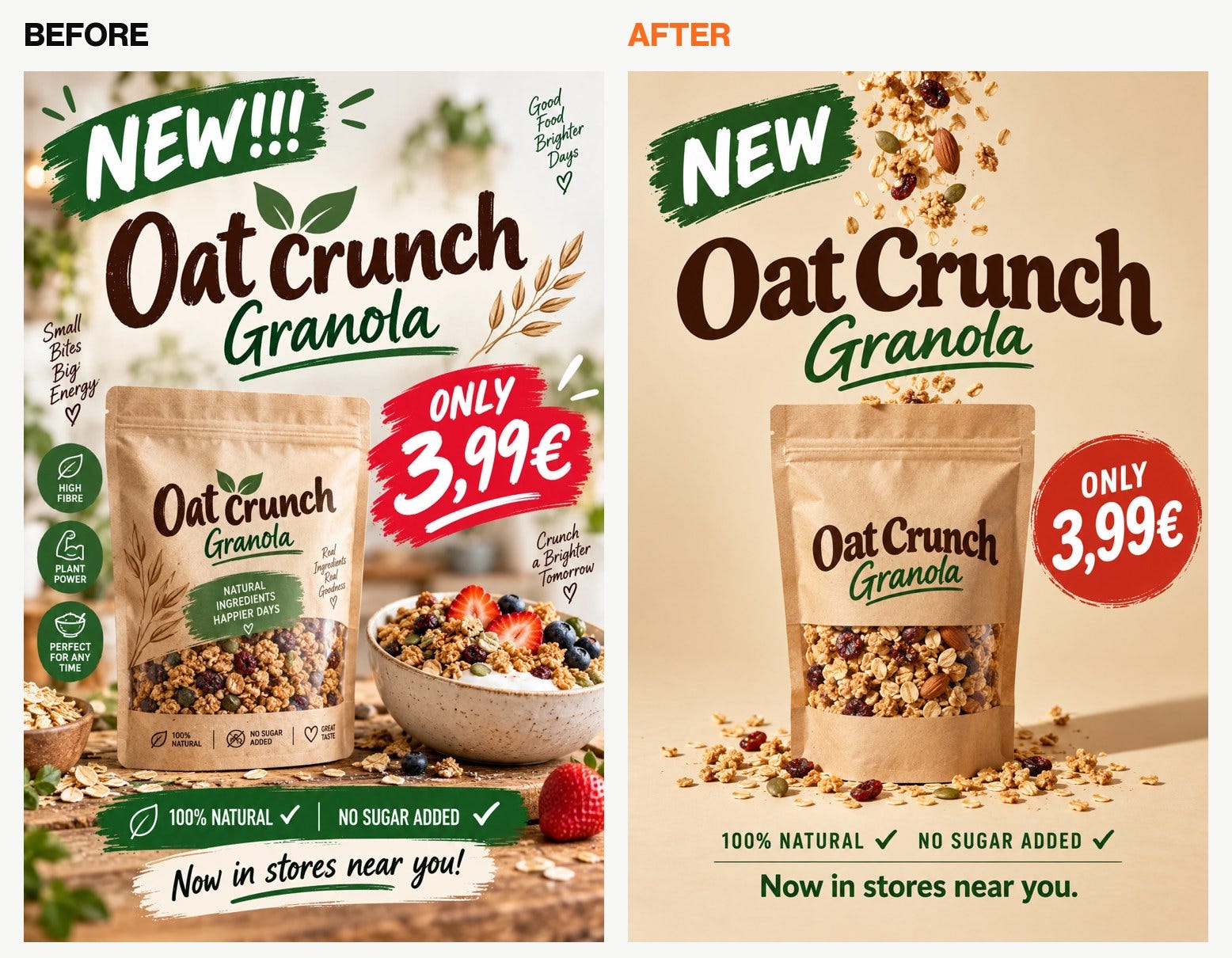
Every word right and the three invented claims are gone. The exclamation marks changed, and the price still sits in a round badge.
None of the six redesigns added a slogan, and every date, time and price came out right.
About the “codes”
You’ve probably seen posts promising 200 ChatGPT codes for posters: /swiss, /editorial, /retro70s.
They aren’t commands. ChatGPT has no list of codes, and the slash does nothing. They work because ChatGPT knows what a Swiss poster or an editorial layout looks like, so the word acts as a style hint.
A code alone gives ChatGPT a look without any rules. I wrote each style as one full line instead, so it knows what the look means. Six of them:
/swiss: Swiss minimal. Strict grid, one grotesk sans-serif in two weights, everything flush left, one accent colour on white, headline huge.
/editorial: Editorial magazine. Big serif headline, one full-bleed photo, details in small capitals, lots of white space.
/premium: Quiet luxury. Off-white or one deep colour, thin serif, small centred type, one product photo, gold or black accents only.
/jazzcover: 1950s jazz record sleeve. Duotone photo, condensed sans-serif, solid colour bars, tight blocks of type.
/studio: Studio product hero. Product on a plain colour backdrop, one hard shadow, headline above it.
/typeonly: Type only. No image. The headline is the picture and fills most of the poster.
Paste the whole line into the STYLE section.
The full set of 24 for posters and, plus a ready IDEA for six common flyers, is in the Secret stack along with other free resources that are available only for my susbcribers. If you’d like to get access, please subscribe below and you’ll receive a link to the Secret Stack.
Four follow-ups for the same chat
When one word comes out wrong, don’t start over:
The word “[WRONG]” should be “[CORRECT]”. Change only that. Keep everything else exactly the same.
When a line goes missing:
You left out the line “[LINE]”. Add it back exactly as written, in the right place for its importance. Change nothing else.
When extra text creeps back in:
Remove every piece of text that is not on my TEXT list, including words on signs, packaging and in the background. Change nothing else.
When you need it for Stories:
Make a 9:16 Instagram Story version of this poster. Same design, same text.
The 30-second check before you post
Read the poster out loud against your TEXT list. Check every date and time, every price with its currency sign and comma, and every name and address. Then look for any line that isn’t on your list, including text on signs, mugs and packaging. If you sell food, drinks or cosmetics, check twice for claims you didn’t write.
Recap
1. Write your flyer’s text as a list, one line per quote.
2. Write one sentence about the picture the poster is built around.
3. Upload your old flyer to ChatGPT and paste the prompt with your TEXT and IDEA.
4. Pick a style line or leave STYLE empty.
5. Do the 30-second check, then fix single words in the same chat.
If this saves someone at your company an evening in Canva, forward it to them.
See you next week.
Aljaz